Naval Said "Make Your Own App Store" — So I Did
I was scrolling through X when I saw Naval’s post:
“AI coding agents can now deliver one-shot custom apps straight to your phone. It’s the beginning of the end for the iPhone’s dominance.”
And then, casually: “Make your own App Store.”
He wasn’t joking. He had a screenshot of an actual app on his iPhone – “My App Store” – listing custom apps like AirChat, Medical, Photo Food Log, and Homeschool. Each with version numbers, build dates, and Open/Update buttons. Running right there on his home screen like it was the most normal thing in the world.
I stared at it for a solid minute. Then I did what I always do when someone posts something cool on X.
I built my own.
The Idea
Naval’s point is sharp and worth sitting with: if AI can generate custom apps on demand, why are we still locked into a single corporation’s app store? Why can’t you have your own shelf of apps, built for your specific needs, running on your phone?
The traditional app store model assumes apps need to be reviewed, approved, and distributed through a gatekeeper. But when you’re building personal tools – a gravity simulation you made for fun, a piano game for your daughter, a file manager born from nostalgia – you don’t need a gatekeeper. You need a shelf.
AppShelf
So I built AppShelf – a personal app catalog that runs as a Progressive Web App on your iPhone.
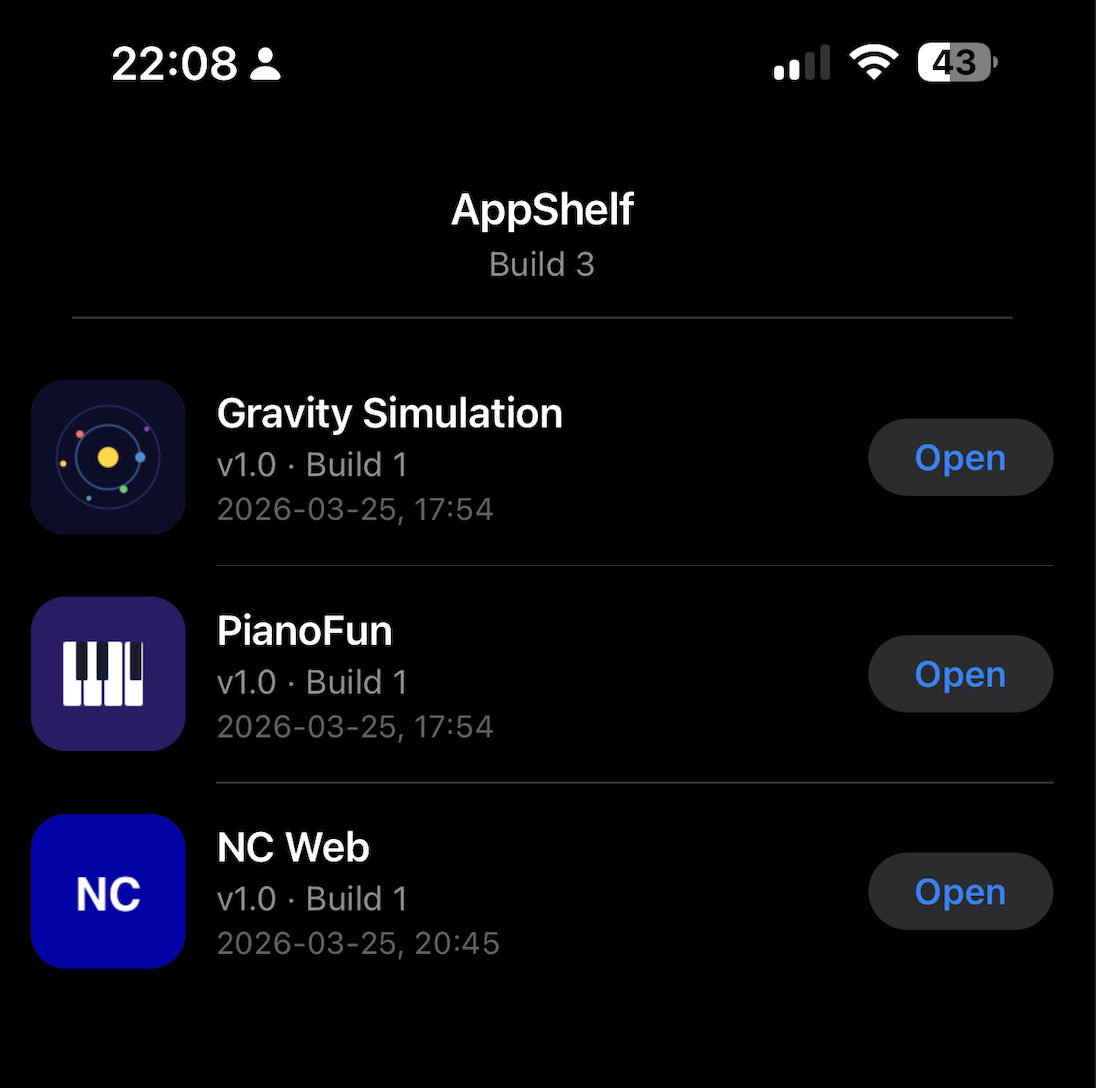 AppShelf running on iPhone with three apps: Gravity Simulation, PianoFun, and NC Web
The concept is dead simple:
- A dark-mode UI that looks and feels like a native iOS app
- A list of your apps with icons, version numbers, build dates
- “Open” buttons that launch each app
- Add it to your home screen via Safari, and it runs fullscreen – no address bar, no browser chrome
Under the hood, it’s vanilla JavaScript with zero dependencies. No framework, no build step, no npm packages. The entire app catalog is a single apps.json file:
1
2
3
4
5
6
7
8
9
10
11
12
13
14
{
  "name": "AppShelf",
  "build": 3,
  "apps": [
    {
      "id": "gravity-sim",
      "name": "Gravity Simulation",
      "version": "1.0",
      "build": 1,
      "icon": "icons/apps/gravity-sim.png",
      "url": "https://victorantos.github.io/GravitySimulation/"
    }
  ]
}
Want to add an app? Edit the JSON. Push. Done.
Filling the Shelf
An empty app store isn’t very inspiring. So I looked at what I’d been building lately and realized – I already had the apps. They just weren’t on a shelf yet.
Gravity Simulation – A real-time N-body gravity simulation running on WebGPU compute shaders. Thousands of particles forming galaxies in your browser. I built it to learn GPU programming and ended up with something genuinely mesmerizing. Click to spawn stars, drag to fling them, right-click to create a black hole.
PianoFun – A piano learning game I vibe-coded for my daughter. Connect a MIDI keyboard, notes fall down the screen Guitar Hero-style, and she turned into my product manager. It even has an egg-catching mini-game because apparently that’s what 7-year-olds demand.
NC Web – A Norton Commander clone for the browser, born from pure nostalgia. Dual-pane file management, F-key shortcuts, that beautiful blue background. The 90s in a browser tab.
All three are now PWAs – installable, offline-capable, running fullscreen on your phone. And all three sit on my AppShelf, one tap away.
The Technical Bit
For anyone who wants to build their own, here’s the stack:
- Frontend: Vanilla HTML, CSS, JavaScript. ES modules. No build step.
- Styling: Pure black OLED background, iOS system fonts, iOS-style rounded icons and pill buttons. It looks native because it copies iOS’s design language pixel by pixel.
- PWA:
manifest.jsonfor installability, service worker for offline caching. Network-first for the app catalog (always fresh data), cache-first for static assets (fast loads). - Hosting: GitHub Pages. Free. Automatic deployment via GitHub Actions.
- Cache busting: The deploy workflow stamps the service worker with the git commit hash, so every push automatically invalidates the old cache. No manual version bumping.
- Data: A flat JSON file. No database, no API, no backend. Edit, push, done.
The whole project is about 300 lines of JavaScript and 200 lines of CSS. That’s it. That’s your personal app store.
The Point
Naval’s post resonated because it names something we’re all starting to feel: the tools to build custom software have gotten so good that the distribution bottleneck is now the real constraint. You can vibe-code an app in an afternoon, but getting it onto your phone still means going through Apple’s review process, paying $99/year for a developer account, and hoping your app doesn’t get rejected because your metadata screenshot has the wrong aspect ratio.
Or you can just… make a PWA and put it on a shelf.
Is this going to replace the App Store? No. But for personal tools, weekend projects, and the kind of apps that exist because you saw a post on X and your brain said “I could build that” – you don’t need the App Store. You need AppShelf.
Open Source
The whole thing is on GitHub. Fork it, fill it with your own apps, deploy it for free:
github.com/victorantos/AppShelf
Naval said make your own app store. So I did. It took an evening, it’s running on my phone, and every app on it is something I built because the vibes were right and the AI was willing.
The 386 kid in me is screaming again. But this time, the shelf is mine.