I Saw Norton Commander on X and Nostalgia Made Me Build It for the Web
I was scrolling through X the other day – you know, the usual doom-scroll between coffee and pretending to be productive – when someone posted a screenshot of Norton Commander.
And just like that, I was gone.
Not gone as in “closed the app.” Gone as in mentally teleported back to 1995, sitting in front of a beige 386, the CRT monitor humming that warm electric hum, a turbo button on the case that I pressed religiously even though I had no idea what it did.
The Blue Panels That Raised Us
If you grew up with DOS, Norton Commander wasn’t just a file manager. It was the interface. Before Windows made everything point-and-click, NC gave us two blue panels, an F-key toolbar, and a sense of absolute power over the file system.
F5 to copy. F6 to move. F8 to delete (with the confidence of someone who didn’t know what backups were). Alt+F1 to switch drives. Tab to jump between panels. You didn’t need a mouse. You didn’t want a mouse.
I remember upgrading to a Pentium 1 and feeling like I was piloting a spaceship. The files loaded faster. Norton Commander felt even snappier. Life was good. The internet was dial-up, and the biggest virus threat was your cousin’s floppy disk.
The X Post That Started It All
So there I was, decades later, staring at that screenshot on X. The blue background. The cyan borders. The green filenames. It all came flooding back – the sound of the keyboard, the smell of the computer room, the thrill of navigating directories like a hacker in a movie.
And then the thought hit me:
“What if I just… built this? In a browser?”
Not a serious enterprise tool. Not a startup. Just a pure, unfiltered nostalgia project. The kind of thing you build on a Saturday because the vibes are right and the coffee is strong.
Vibe-Coding a Time Machine
I fired up Claude and started vibe-coding. Norton Commander’s UI is dead simple – two panels, text rows, function keys. No gradients, no rounded corners, no animations trying to impress anyone. Just information, laid out cleanly. The build should match that energy. So I went with vanilla JavaScript, HTML, and CSS. No framework. No build step. No node_modules folder the size of a small country. If the original ran on a 386 with 4 MB of RAM, the web version shouldn’t need a bundler and 200 npm packages to render a file list.
The goal was simple: make it feel like Norton Commander. The blue background. The dual panels. The F-key toolbar at the bottom. The column headers you could click to sort. The cursor highlight in cyan. All of it.
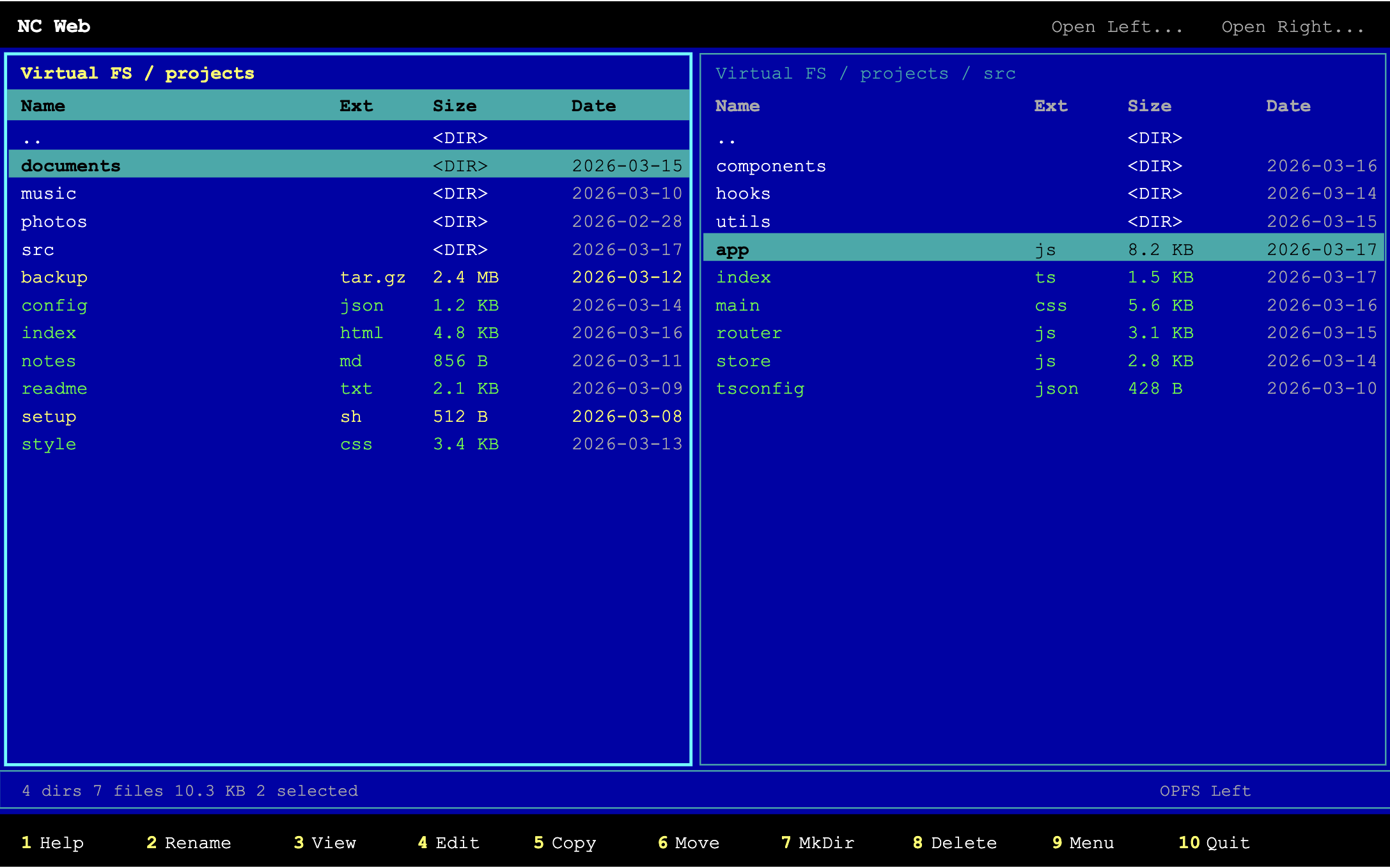
A few hours in, I had two panels side by side, files listing with names, extensions, sizes, and dates. I could navigate with arrow keys, open directories with Enter, go back with Backspace. Tab switched panels. It felt right.
Then I kept going:
- F3 to view files, F4 to edit them – with a built-in text editor, just like the original
- F5/F6 to copy and move between panels – including across different file systems
- F7 to create directories, F8 to delete – with confirmation dialogs, because we’re adults now and we’ve learned the hard way
- Insert and Space to select multiple files – yellow highlights, just like the old days
- Right-click context menu – okay, NC didn’t have this, but we live in the future
For the file system, I used two browser APIs: the Origin Private File System (OPFS) for sandboxed browser storage that works everywhere, and the File System Access API for actual native filesystem access in Chromium browsers. You can copy files from your real disk into the virtual filesystem and back. Two worlds, one commander.
I wrapped it all up as a Progressive Web App – service worker, manifest, installable on your phone. Norton Commander in your pocket. The 90s kid in me is screaming.
The Whole Thing Is Open Source
I put it on GitHub because that’s what you do when nostalgia produces something actually usable:
Zero dependencies. No build step. Clone it, serve it, use it. Or just open it in your browser and pretend it’s 1995 for a few minutes. I won’t judge. I’ll be right there with you.
Some projects exist to solve problems. Some exist to make money. And some exist because you saw a screenshot on X and your brain said, “remember when computers were fun?”
This one’s for the 386 kids. The Pentium 1 pioneers. The ones who knew cd .. before they knew long division.
F10 to quit. But you won’t want to.